Component Name: ToggleButton
States: On and Off
Description
An widget that represents a button that remains pushed-in when pushed, or
pops out when pushed a second time. An example would be a tool bar button in a
word processor that "toggles" between bold text being turned "on"
or "off" affecting selected text. The Swing Set examples are a titch
more creative and actually animate elements. Again, there are Text ToggleButtons
and Image ToggleButtons.
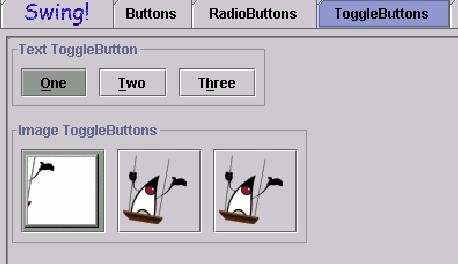
Component Name: ToggleButton - On
Navigation
- Required navigation sound effect.
navigate.wav
- Optional disabled sound effect.
disabled.wav
- Optional combined component ID and state information sound effect.
toggle_on.wav
- Required name/title of component as speech. <Togglebutton label>
[Alternate: "no label"].
- Optional role as speech. <ToggleButton> [Alternate: "unknown
object"].
- Optional state as speech. "on" [Alternate: "status unknown"].
Activation
- Required activation sound effect.
toggle_off.wav
- Required name or label of component, as speech. <Togglebutton label>
[Alternate: "no label"].
- Optional Role: <ToggleButton>. [Alternate: "unknown object"].
- Required new state of component, as speech. "off" [Alternate: "status
unknown"].
"Where Am I?"
- Optional disabled sound effect.
disabled.wav
- Optional combined component ID and state information sound effect.
toggle_on.wav
- Required name/title of component as speech. <Togglebutton label>
[Alternate: "no label"].
- Optional role as speech. <ToggleButton> [Alternate: "unknown
object"].
- Optional state as speech. "on" [Alternate: "status unknown"].
Additional Information (Control + shift + E)
- Hot Key – (if available) [Alternate: "no Hot Key available"]
.
- Shortcut Keys – (if available) [Alternate: "no Shortcut Key
available"] .
Component Name: ToggleButton - Off
Navigation
- Required navigation sound effect.
navigate.wav
- Optional disabled sound effect.
disabled.wav
- Optional combined component ID and state information sound effect.
toggle_off.wav
- Required name/title of component as speech. <Togglebutton label>
[Alternate: "no label"].
- Optional role as speech. <ToggleButton> [Alternate: "unknown
object"].
- Optional state as speech. "off" [Alternate: "status unknown"].
Activation
- Required activation sound effect.
toggle_on.wav
- Required name/title of component as speech. <Togglebutton label>
[Alternate: "no label"].
- Optional role as speech. <ToggleButton> [Alternate: "unknown
object"].
- Required new state of component, as speech. "on" [Alternate: "status
unknown"].
"Where Am I?"
- Optional disabled sound effect.
disabled.wav
- Optional combined component ID and state information sound effect.
toggle_off.wav
- Required name/title of component as speech. <Togglebutton label>
[Alternate: "no label"].
- Optional role as speech. <ToggleButton> [Alternate: "unknown
object"].
- Optional state as speech. "off" [Alternate: "status unknown"].
Additional Information (Control + Shift + E)
- Hot Key – (if available) [Alternate: see below*]
.
- Shortcut Keys – (if available) [Alternate: see below*] .
*If there is neither a hot key nor a shortcut
key, the general error is sounded.
Table of Contents
End of file
Last
updated 11/02/98