Description
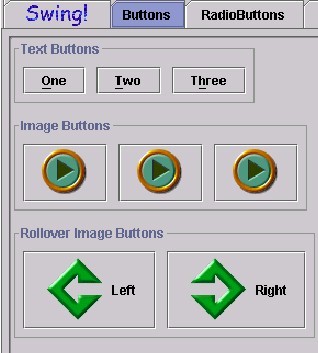
A button that represents a push button. Illustrated below are the three kinds of buttons identified in the current Swing Set version. There are text buttons with choices such as One, Two or Three which might translate into OK, Cancel and Help. There are image buttons which are represented as arrows, and Rollover Image buttons which have a definite "direction" in this case, left or right. The function is the same, the representation allows for developer creativity.
Sound Rationale
Because a button is often a shortcut to activate a function, the identifying sound needs to be short and to the point. A two tone sound is used, in rapid pace, close together so that the computer user can grasp the concept of a button without having to listen to long refrains of sound and speech. By keeping the sound short, "listening time" can be spent on identifying the button to determine if it is the one the computer use wants or not.
Navigation
Activation
"Where Am I?"
Additional Information (Control + Shift + E)
*If there is neither a hot key nor a shortcut key, the general error is sounded.