Component Name: Tree Component Form
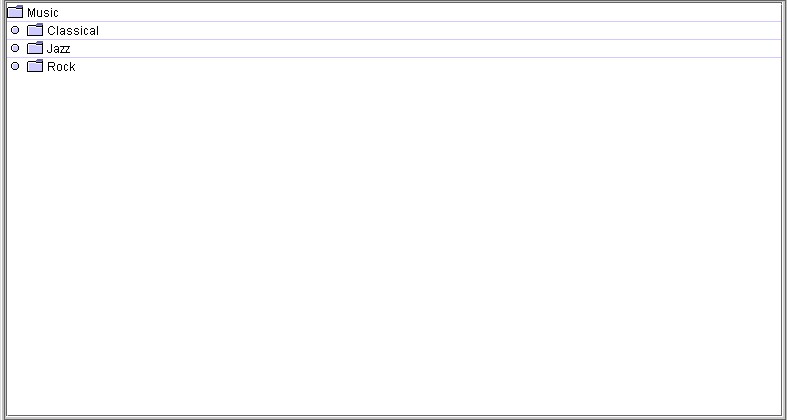
State: Collapsed and Expanded
Description
A control that displays hierarchical data as an outline. Each item in the tree is
referred to as a "node". A given node can be identified either by a tree path,
or by its display row. A tree path is a list of the ancestors of the node plus the node
itself. It is similar to how we implemented the "where am I" function for menus
in the demo. A node's display row is the row on the display that contains only the node in
question.
Nodes can be expanded or collapsed. An expanded node displays its children in rows
below it. A collapsed node is one which hides them. At any given time, various parts of
the tree can be expanded and collapsed. A typical example of tree use is in a file system
browser.
Trees can have one of three selection modes. For "single tree selection",
only a single tree path can be selected at any given time. "Contiguous" means
that only items that are adjacent can be added to the selection. Note that this type of
selection precludes single tree selection; however, the contiguous selections are made up
of tree paths. Finally, there is "discontiguous" selection which means that
paths that are not even adjacent.
In the illustration above, thr focus is on a c:\ dirve with folders or
directories "branching" off of it. The Jfw32 folder/directory has been expanded
to show one level of elements, then some of those folders/directoris have been expanded to
show even more elements. Files and documents are the lowest part of a tree and may be
referred to as "leaves". In this case each folder/directoy has a + or - beside
it indicating whther it can be expanded (+) or collapsed (-).
Sound Rationale
The sound assigned to "Tree" can be interpreted as either a
short version of something collapsing, or as the single draw of a saw toward you. Taking
either interpretation, gives one the idea of a Tree, directories, elements, files,
anything which can be branched out or contracted to it's root.
Component Name: Tree - Collapsed
Navigation
- Required navigation sound effect. navigate.wav
- Optional disabled sound effect. disabled.wav
- Optional combined component ID and state information sound effect. tree.wav + collape_tree.wav
- Required name/title of component as speech. <name of tree or name of node>
[Alternate].<unknown tree or unknown branch>
- Optional role as speech. Tree or Branch [Alternate]. Unknown object
- Optional state as speech. <Collapsed> [Alternate].N/A
Activation
- Required activation sound effect. activate.wav + expand_tree.wav
- Required name or label of component, as speech. <title of tree or branch>
[Alternate.] <unknown tree or branch>
- Optional Role: Treeor Branch
- Required new state of component, as speech. <Expanded> [Alternate.] N/A
"Where Am I?"
- Required speech: immediate parent, or entire hierarchy as appropriate. <title and
component type of relevant parent + tree.wav
+ title of tree + collapse_tree.wav
+ title of branch + Collapsed> [Alternate]. <unknown path + tree.wav + unknown tree or branch + collapse_tree.wav +
unknown branch + Collapsed>
Optional disabled sound effect. disabled.wav
- Optional combined component ID and state information sound effect. N/A
- Required name/title of component as speech. N/A [Alternate]. N/A
- Optional role as speech. N/A [Alternate]. N/A
- Optional state as speech. N/A [Alternate]. N/A
Additional Information (Control + shift + E)
- Hot Key – [if available] [Alternate] <no Hot key available>
- Shortcut Keys – [if available] [Alternate] <no Shortcut key available>
Component Name: Tree - Expanded
Navigation
- Required navigation sound effect. navigate..wav
- Optional disabled sound effect. disabled.wav
- Optional combined component ID and state information sound effect. tree.wav + expand_tree.wav
- Required name/title of component as speech. <name of tree or name of node>
[Alternate].<unknown tree or unknown branch>
- Optional role as speech. Tree or Branch [Alternate]. Unknown object
- Optional state as speech. <Expanded> [Alternate].N/A
Activation
- Required activation sound effect. activate.wav + collapse_tree.wav
- Required name or label of component, as speech. <title of tree or branch>
[Alternate.] <unknown tree or branch>
- Optional Role: Tree or Branch
- Required new state of component, as speech. <Collapsed> [Alternate.] N/A
"Where Am I?"
- Required speech: immediate parent, or entire hierarchy as appropriate. <title and
component type of relevant parent + tree.wav
+ title of tree + expand_tree.wav
+ title of branch + Expanded> [Alternate]. <unknown path + tree.wav + unknown tree or branch + expand_tree.wav +
unknown branch + expanded>
Optional disabled sound effect. disabled.wav
- Optional combined component ID and state information sound effect. N/A
- Required name/title of component as speech. N/A [Alternate]. N/A
- Optional role as speech. N/A [Alternate]. N/A
- Optional state as speech. N/A [Alternate]. N/A
Additional Information (Control + shift + E)
- Hot Key – [if available] [Alternate] <no Hot key available>
- Shortcut Keys – [if available] [Alternate] <no Shortcut key available>
Table of Contents
End of file
Last updated 11/14/98 by Karen McCall