Component Name: Progress Bar
States: In Progress, Done
Description
This is used to provide feedback while some other activity is ongoing. For example,
while loading the contents of a file, the progress bar would indicate how much is loaded,
and how much more time will be taken up by the loading operation.
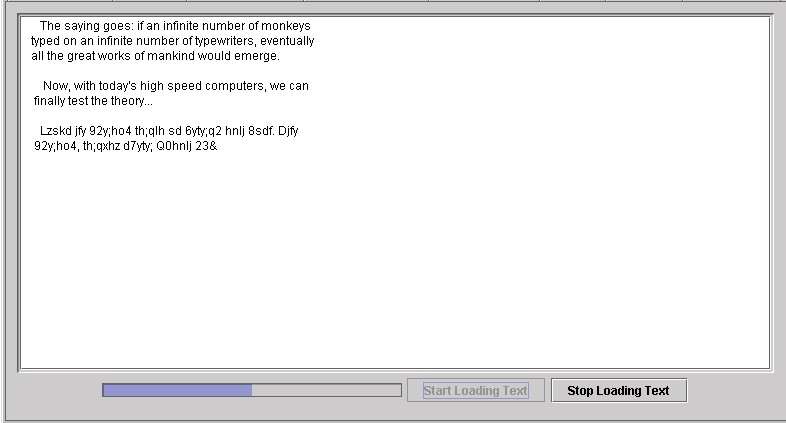
Below is an example of a Swing Set progress bar. In Swing Set you have the option of
starting and pausing/stopping progress. One of the other innovations is that a computer
user can acutally see the document/object as it is loading (something not always available
at the present time)
Sound Rationale
The two sounds associated with this function are very different. While in progress, the
sound is that of a clock or metranome ticking away the time, a constant reminder to the
computer user that something IS happening on their screen and within their application.
The sound is a moderate one, so that the computer user is not frustrated by a sound that
is too fast or too slow.
Once finished, the computer user needs to be able to distinguish the difference between
the actions of "in progress" and "done" so the "done" sound
is again an electronic one, reminiscent of the end of a slide show, a tranistion from one
place to another, sort of "science fiction" based in it's conceptual use! It is
short, but "final" in it's sound.
Component Name: Progress Bar - In Progress
Navigation
- Required navigation sound effect. N/A
- Optional disabled sound effect. disabled.wav
- Optional combined component ID and state information sound effect. progress_bar.wav
- Required name/title of component as speech. N/A [Alternate]. N/A
- Optional role as speech. Progress Bar [Alternate]. Unknown object
- Optional state as speech. The state should be available if the user request it by using
shortcut or hot keys and that is when you get the percentages [Alternate]. N/A
Activation
- Required activation sound effect. N/A
- Required name or label of component, as speech. N/A [Alternate.] N/A
- Required new state of component, as speech. N/A [Alternate.] N/A
"Where Am I?"
- Required speech: immediate parent, or entire hierarchy as appropriate. <title of
application + title of action being performed on system (ex: downloading, formatting,
scanning) + in progress> this entire time the metronome sound is being heard, the sound
is not stopped until the progress bar is done [Alternate]. N/A
- Optional disabled sound effect. disabled.wav
- Optional combined component ID and state information sound effect. N/A
- Required name/title of component as speech. N/A [Alternate]. N/A
- Optional role as speech. N/A [Alternate]. N/A
- Optional state as speech. N/A [Alternate]. N/A
Additional Information (Control + Shift + E)
- specific information on the progress bar (numerical values, percentage done, etc)
Component Name: Progress Bar - Done
Sound Rationale
Navigation
- Required navigation sound effect. N/A
- Optional disabled sound effect. disabled.wav
- Optional combined component ID and state information sound effect. progress_bar_done.wav
- Required name/title of component as speech. N/A [Alternate]. N/A
- Optional role as speech. Progress Bar [Alternate]. Unknown object
- Optional state as speech. <Done> [Alternate]. N/A
Activation
- Required activation sound effect. N/A
- Required name or label of component, as speech. N/A [Alternate.] N/A
- Required new state of component, as speech. N/A [Alternate.] N/A
"Where Am I?"
- Required speech: immediate parent, or entire hierarchy as appropriate. N/A [Alternate].
N/A
- Optional disabled sound effect. N/A
- Optional combined component ID and state information sound effect. N/A
- Required name/title of component as speech. N/A [Alternate]. N/A
- Optional role as speech. N/A [Alternate]. N/A
- Optional state as speech. N/A [Alternate]. N/A
Additional Information (Control + Shift + E)
- Hot Key – N/A
- Shortcut Keys – N/A
Table of Contents
End of file
Last updated 10/31/98 by Karen McCall