Component Name: Desktop Icon
Description
A visual/picture representation of an application, document, dialog or any other component of the Swing Set. It is, in effect, a shortcut to reaching the deired component/application/document.
Navigation
Activation
"Where Am I?"
Additional Information (Control + Shift + E)
Additional Sounds Incorporated into Swing Set Demo
"General Disabled Sound" - This is a sound which is played when an option is not available. The User Interface Design Team volleyed back and forth between the game show buzzer used in the NotePad demo and the sumbarine ping which was fianlly decided on.
It was felt that the short sharp buzzer sound was too "abrasive" a way of letting a computer uer know that something was simply not available, not that they had done something wrong. The submarine ping is used to reinforce location, let you know there is something there and if it is not available, you can go back and check it against your original "where am I and what can I do" position. To the Team it seemed readily identifiable as a "real woeld sound" that people could relate to.
One note of concern by one of the Team members is that whereever possible the term "not available" should be used instead of "disabled". This concern is semantic and attitudinal in nature. Although the term "disabled" is easy to use and readily identifiable as something that "doesn't work", the broader implications extend toward the way people with disabilitis are viewed by society. The best example is that tractor trailer that was disabled and blocking traffic, or the highway ramp that was not available due to a disabled vehicle. "Disabled" means blocking progress, keeping the masses back, from doing their daily work, and at the very least getting in the way. We would not think of aying that a francophone, Christian, female (or any other descriptor) tractor trailer caused traffic problems. How can a society bombarded with all this prevention of progress, then think of hiring, educating or otherwise including someone with a disability if that person with a disability is perceived as blocking progress, preventing work from being done or getting in the way? The concession to calling the file "disabled.wav" was made for the same reason the term is widely used, it is shorter and easy to use. Whereever possible, however, the term "Not Available" or some other descriptor should be used instead.
Backspace - When one gets "fluent" at using a keyboard, or even when one is learning the keystrokes, it is important to distinguish beween the Backspace and the Enter keys, and the Backspace and the Delete keys. A simple sound which lets the computer user know that they have indeed done the Backspace action is an important element of text editing. In our Demo, a single light, cow-bell sort of sound is used. It is also important for audio output of exactly what has been Backspaced over!
Delete - Again, becasue one can easily Delete something while meaning to hit the Enter or Backspace key, it is important to know what action has been performed. A single simple tone, sounding like a plug or pop releasing has been used for the Delete sound. Also, the text that has been deleted should be echoed to the computer user.
Enter - in dialog box only - The User Interface Design Team decided that it is important to know in a dialog box which keystroke you have done. Traditionally the Tab key and the enter key perform navigation and activation functions respectively. So, in a dialog box ONLY, we have assigned a sound for pressing the Tab key, and one for pressing the Enter key. We are not sure if the Swing Set will allow this, but we included the sounds anyway.
No Text - It is also important to know whether there is a chracter, word or sentence before or after your current position. For example if I am in an Input Field and have Backspaced to delete text, once I have reached the point where I can't Backspace any further, a sound should be available to let me know that in cse I lost count of how many characters I have taken out. I should also know if I have reached the end of my editing, that there are no more senetences, words or characters. So if I tell my computer to "Read Previous" and there is no previous item, a sound would give me a clue to this. Otherwise I am not sure whether the keystroke has worked, my computer has frozern or any other number of things that could go wrong in a totally speech output dependent system.
Separator: Not being done
The horizontal line that appears in menus and visually groups related items within a single menu. It's debatable whether this needs to be sonified. I have heard arguments on both sides. If we do sonify this, it should be later rather than sooner.
ToolTip - using the NotePad demo sound
The little piece of text that pops up when the mouse lingers over a tool bar button, for example. We have partially sonified this by allowing users ask for the tool tip. But, nothing has been done in terms of alerting the user when it pops up spontaneously. Should we do something in this regard?
ToolBar - done for NotePad project
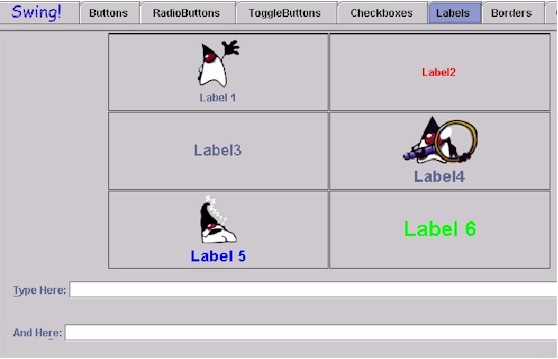
Labels are text based components see text elements
A Label is a short piece of static text, or an icon, or both, that labels some other object. A typically example is a piece of text or icon used to denote the purpose of an editable text field.
Example of Swing Set Labels
Spinners and StringSpinners see List
ScrolBar and Split Panes are a totally visual way of perceiving information and the same result can be achieved by toggling between docuemtns, or applications. For this reason the User Interface Design Team decided that these components were not to be done
Used to move about the contents of a window when those contents do not fit entirely within the viewing area. We did not sonify this in the Notepad demo because I felt that this widget is truly visual in nature. Rather, we tried to implement meaningful keyboard navigation of the text without having to actually acquiring and activating a scroll bar
Thumb: you should be able to ask how far down the document you are; should be shortcut to tell you cursor position in relation to total document. Not sonified.
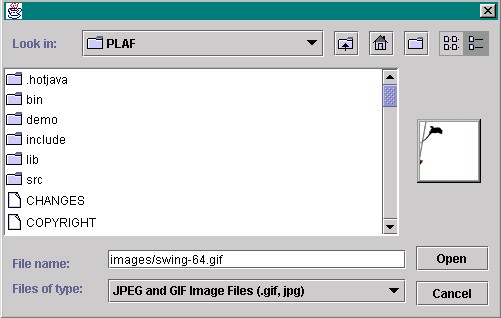
File Chooser – see List
Below is an example of the Swing Set File Chooser.
Colour Chooser – RGB or Hue? Since there are "official Pantone colours" for puclishing, and these colours have been translated into HTML coding, Karen is looking into the possibility that they also might have names so that we can use the hex-3 percents to generate a "colour name". It will not allow access to EVERY colour of the rainbow, but it will enable some use of colour on non-screen based devices. (this is also the only place where Joseph found a spinner used)
The User Interface Design Team found a chart of Pantone colours used in Desktop Publishing, and a sort of "standard of colour", which had been converted into HTML colour codes. We are still looking for some indication as to whether these colours have more "common names" which could then be atached to percentages when achieved in a Colour Chooser.
Example of a Swing Set Colour Chooser in the default position (HSV)
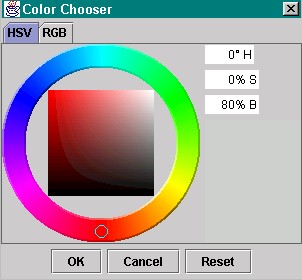
Example of a Swing Set Colour Chooser after colour has been changed. (HSV)

Example of a Swing Set Colour Chooser in the RGB mode.
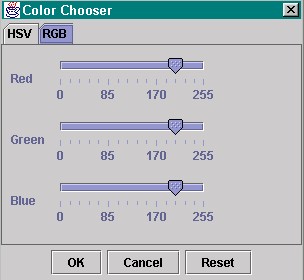
Table of Contents
Last updated 10/30/98